Sources checked November 17, 2026. Research-backed, not physically tested.
The short answer
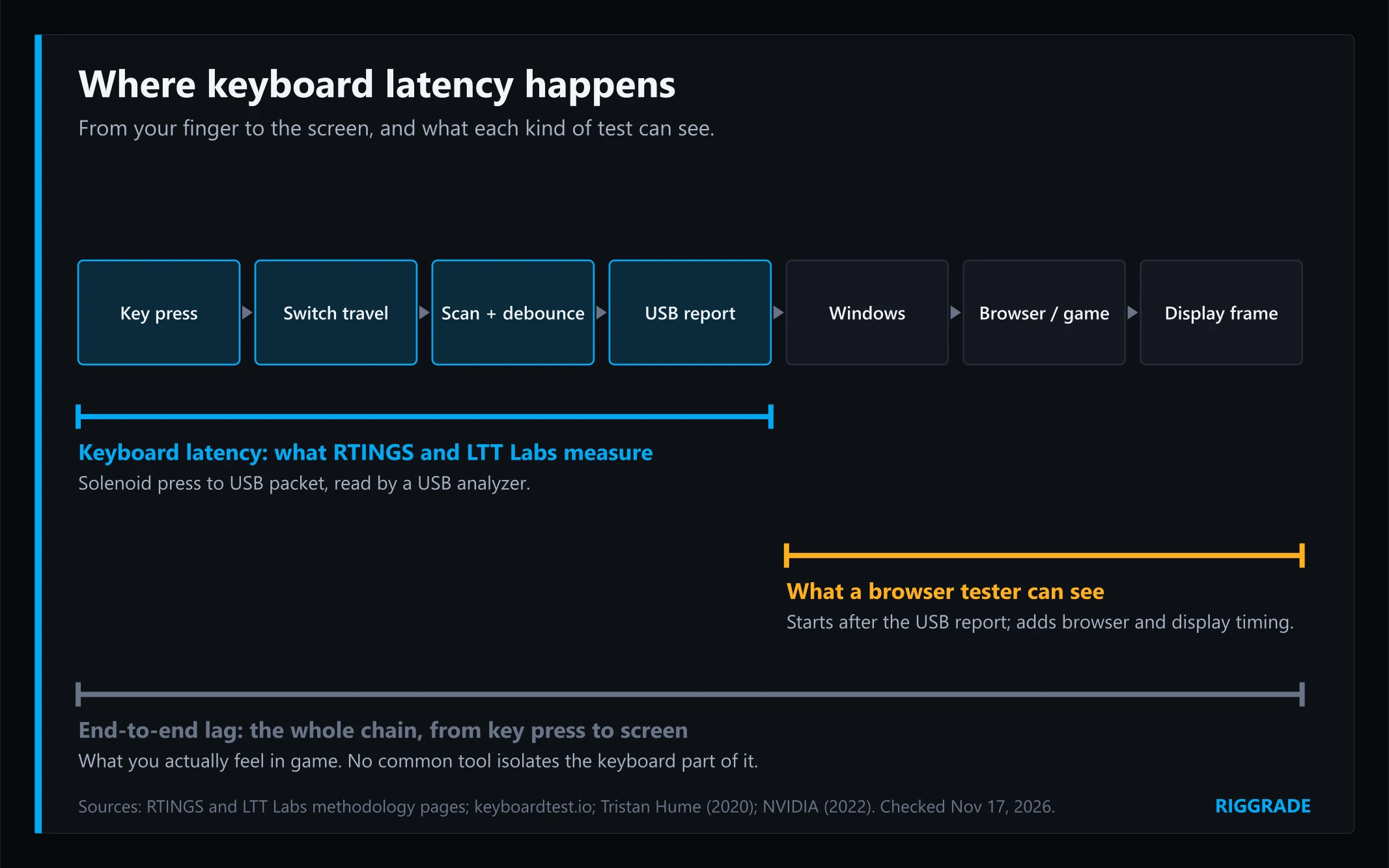
An online keyboard latency test does not measure your keyboard's latency. Browser testers start their timer only after the key press has passed through the switch, the keyboard's processing and the USB link, which is exactly where keyboard latency happens. keyboardtest.io says so on its own page: timing "starts when the system gets the key, after the switch, debounce and USB transfer". What you get is mostly your browser and display timing.
Real keyboard latency is measured by labs such as RTINGS and LTT Labs with a mechanical presser and a USB analyzer. Use an online test to catch problems, such as keys that double-press or a board stuck at a low polling rate, and look up a lab result for your exact model. Our research-backed picks for the best gaming keyboards in 2026/27 lists boards with independent latency verdicts.
What "keyboard latency" actually means
Keyboard latency vs end-to-end lag
Two different delays get called "input lag". Keyboard latency runs from the moment your finger presses the key to the moment the keyboard sends that press to your PC over USB. It includes the switch travel, the keyboard's scanning and debounce, and the USB report. End-to-end latency continues further: through Windows, the game and the display, until something changes on screen. A keyboard can only control the first part.
Polling rate is one link, not the total
A 1,000 Hz keyboard reports every 1 ms; an 8,000 Hz board every 0.125 ms. That interval is only one stage of keyboard latency. Our pillar covers why polling rate and latency are not the same thing, so we keep it short here.
What a browser tester measures
A web page cannot see your key until the operating system hands it over, so everything inside the keyboard is invisible to it. Most testers then measure from that key event to the next screen frame. keyboardtest.io notes that this frame wait alone can reach 16.7 ms on a 60 Hz display and 6.9 ms at 144 Hz. frameratetest.com is just as frank: browser tests "cannot read your keyboard's true hardware scan rate or total system latency". Some testers grade results too: frameratetest.com labels anything under 2 ms "Professional gaming level". Those tiers are the tools' own, not lab thresholds.
What changes in real use
Wired vs 2.4 GHz vs Bluetooth
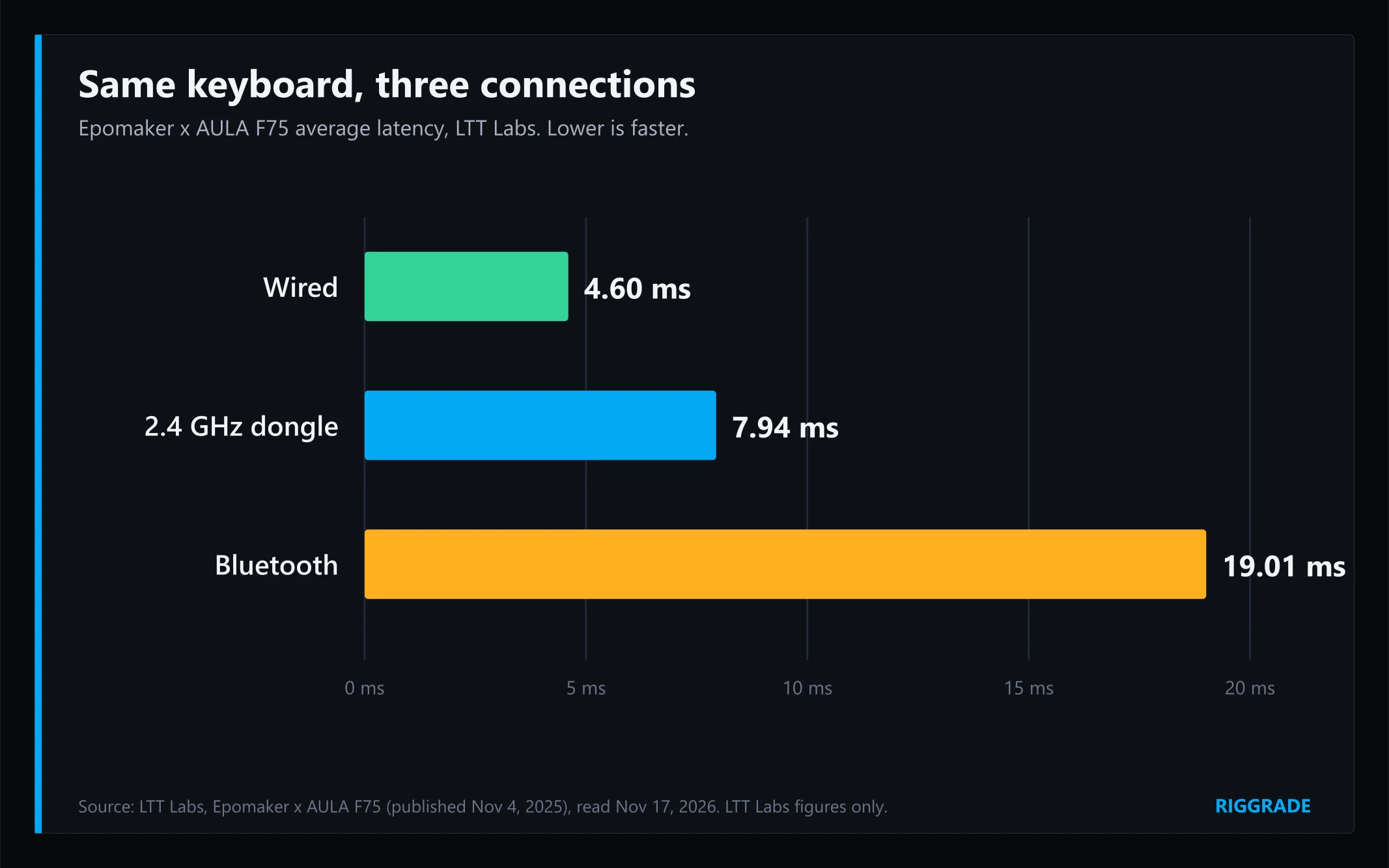
The connection matters more than most settings. On the same keyboard, LTT Labs measured the Epomaker x AULA F75 at 4.60 ms wired, 7.94 ms over its 2.4 GHz dongle and 19.01 ms over Bluetooth. RTINGS describes Bluetooth as a "poor connection type for competitive play". A browser test can show a relative jump when you switch modes on the same PC, but not the true numbers.
Debounce: the setting most players never touch
A mechanical switch's metal contacts bounce for a moment when they close, so the keyboard waits a short time, the debounce period, before trusting the press. That wait is part of keyboard latency, and no browser test can see it. RTINGS shows how much it can matter: with a 4 ms debounce, a board is limited to 250 updates per second even if it polls at 1,000 Hz. Many gaming keyboards let you lower it in their software, and LTT Labs notes that boards without that option "tend to have higher latency" because their defaults are often conservative. Optical and Hall effect switches don't need debounce at all, per RTINGS.
When milliseconds matter
Not as often as testers suggest. RTINGS found that rapid-trigger keyboards it measured, apart from one outlier, spanned 1 to 18 ms of release latency. It notes that is smaller than the reaction-time gap between two sprinters in the same Olympic 100 m final, and that human reaction time is "by far the largest contributor". A study of mouse aiming by NVIDIA researchers (presented at a CHI 2021 workshop) found faster results at 12 ms than at 20 ms of whole-system latency, but with 8 players, of whom only three showed a statistically significant individual improvement. The practical takeaway: a few milliseconds between modern gaming keyboards rarely decide a match. A clearly slow board does. RTINGS' older methodology treated a gap of more than 15 ms between two keyboards as the point where the difference becomes noticeable. Separately, LTT Labs measured the Redragon Kumara K552 at 32.48 ms on average, far behind most boards on its charts.
Evidence: how labs measure keyboard latency
RTINGS
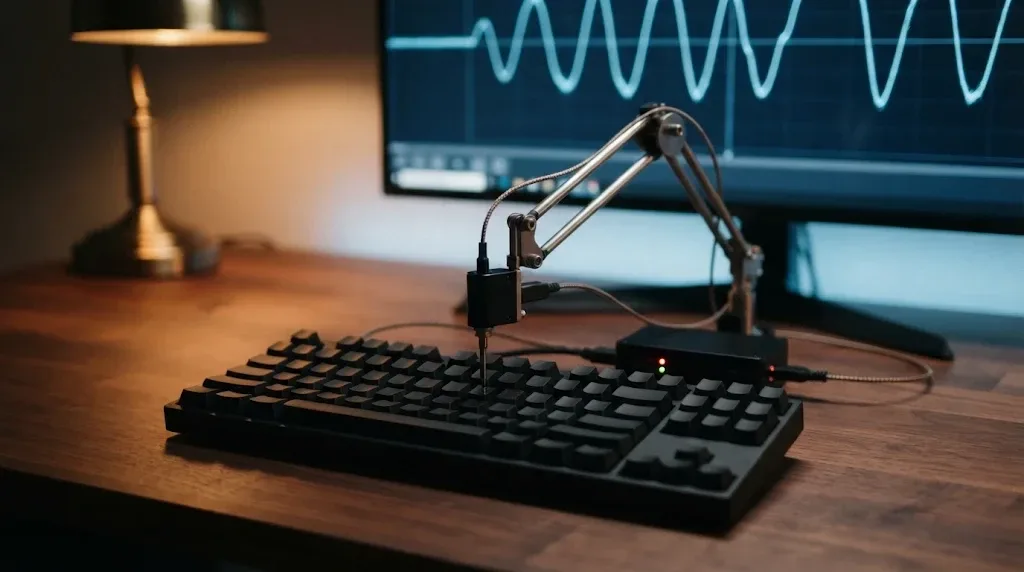
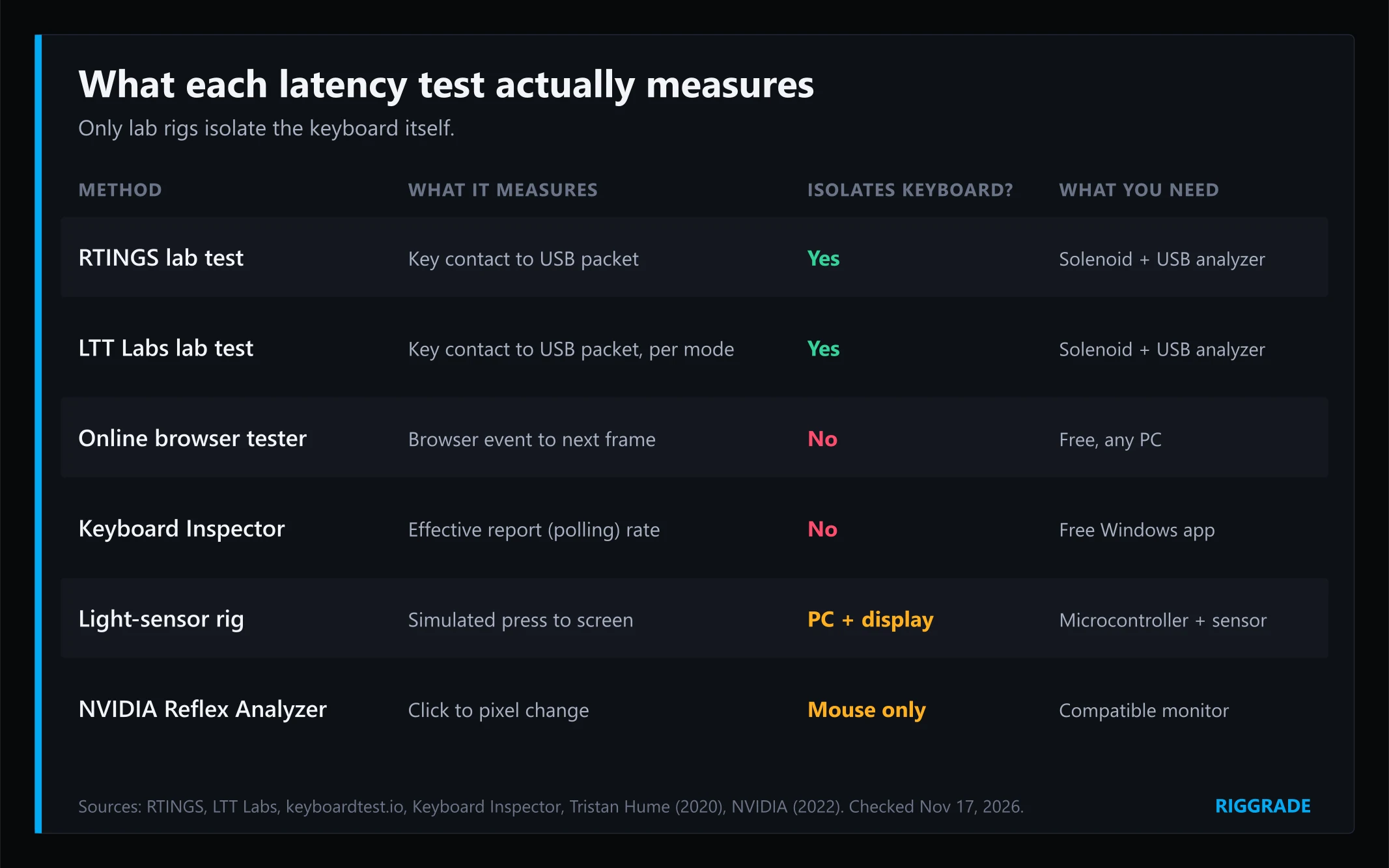
RTINGS uses a solenoid as the finger. Timing starts when it touches the key and stops when a Beagle 480 USB analyzer catches the keyboard's report on its way to the PC. Each test averages 200 presses, with the keyboard set to its fastest options: minimum debounce, maximum polling and the most sensitive actuation. The operating system, the game and the display are deliberately left out. RTINGS publishes written verdicts for free, but its millisecond results are now for members only, which is why RigGrade quotes only its verdicts and figures from its public methodology and research pages.
LTT Labs
LTT Labs described its method in December 2025: a Beagle USB 480 analyzer and a solenoid, with copper tape on the keycap to detect the exact moment of contact. It tests wired, 2.4 GHz and Bluetooth separately, with the latest firmware, the lowest debounce and the highest polling, and publishes the minimum, maximum and mean. It also warns that boards without adjustable debounce "tend to have higher latency" because default settings are often conservative. Its averages are public; our latency per dollar on budget keyboards charts several of them.
The early study everyone cites
Programmer Dan Luu measured keyboards with a logic analyzer and found a range from about 15 ms to about 60 ms, with the gaming keyboards in his sample no faster than ordinary ones. It is a small sample, rounded to 5 ms, and the page shows only a 2022 update, so treat it as history rather than current data. It does show why measured results, not marketing, matter.
Do-it-yourself rigs
Hobbyists also measure press-to-screen latency. In the rig engineer Tristan Hume described in 2020, a microcontroller acts as the keyboard and sends the key press, and a light sensor times the change on screen. That measures the PC and display, not your keyboard. NVIDIA's Reflex Analyzer also measures whole-system latency, but its documented workflow uses a mouse plugged into a compatible monitor, not a keyboard.
Why you can't compare numbers across labs
RTINGS and LTT Labs both measure from key contact to USB, but their rigs, settings and averaging differ. A board measured at a given figure by one lab is not directly comparable with another board measured by the other. Compare boards within the same lab's results.
Trade-offs
- Accuracy vs effort: a browser test takes seconds but cannot see the keyboard. A light-sensor rig takes hardware and time and measures the whole system. A switch-to-USB measurement needs a solenoid and a USB analyzer, which is why few people outside labs do it.
- Polling vs real scanning: the advertised polling rate is not always the effective one. RTINGS gives the example of a Corsair K65 RGB MINI that polls at 8,000 Hz but scans at 4,000 Hz.
- Lower debounce vs chatter: RTINGS notes that a 4 ms debounce caps effective updates at 250 Hz even with 1,000 Hz polling. Lowering it helps, but setting it too low on a mechanical switch can cause chatter, where one press registers twice. Optical and Hall effect switches don't need debounce, per RTINGS.
- Holding several keys: on some boards latency rises when other keys are held. On a Ducky One 3, RTINGS measured 3.395 ms alone and 4.9345 ms with five keys held.
How to check your own keyboard in 4 steps
- Check the settings first. In the keyboard's software, confirm the connection mode, the polling rate and, if available, the debounce setting. On magnetic boards, check the actuation point too: LTT Labs' method article notes the Sony Inzone KBD-H75 dropped below 1 ms once actuation was set to 0.2 mm.
- Verify the polling rate, not the latency. The free Windows tool Keyboard Inspector, which LTT Labs uses, shows the effective report rate. Browser polling testers are limited: Redragon's own tester notes most browsers cap keyboard events "near ~1000 Hz".
- Use a browser test to catch faults. Look for keys that don't register, double presses or ghosting. Compare relative changes on the same PC, such as dongle vs Bluetooth. Ignore grades such as "Professional gaming level".
- Look up a lab result for your exact model. RTINGS and LTT Labs test specific models and connection modes, so match both. If your board still feels laggy, plug the cable or dongle directly into the PC rather than a hub (RTINGS staff note a standard direct USB 2.0 or 3.x port is enough even for 8,000 Hz), and install the latest firmware, which is how LTT Labs sets boards up before testing.
Two myths to skip: "Game Mode" does not lower latency in general (on Logitech keyboards it disables the Windows and Menu keys), and Windows USB selective suspend is disabled by default for keyboards unless the maker enables it, according to Microsoft, so changing it is unlikely to help.
FAQ
Are online keyboard latency tests accurate?
They are accurate about what they measure, which is your browser and display timing, but they cannot see the keyboard's own latency. Even the testers say so.
What is a good keyboard latency for gaming?
There is no universal cut-off. RTINGS' older methodology treated a gap of more than 15 ms between two keyboards as noticeable. In practice, look for a lab result for your model and avoid clear outliers, such as the Redragon Kumara K552 that LTT Labs measured at 32.48 ms.
How do I test keyboard input lag at home?
Check your connection, polling and debounce settings, verify the report rate with Keyboard Inspector, and use a browser test only to spot faults. For a real latency figure, use a lab result for your model.
Is polling rate the same as latency?
No. Polling sets how often the keyboard reports, every 1 ms at 1,000 Hz and every 0.125 ms at 8,000 Hz. Switch travel, scanning and debounce come before it.
Does Bluetooth add input lag?
Yes. LTT Labs measured 19.01 ms over Bluetooth versus 7.94 ms over 2.4 GHz on the same AULA F75. Use the dongle or a cable for competitive play.
Do Hall effect keyboards have lower latency?
Not automatically. Magnetic switches don't need debounce and allow shallow actuation, which can lower latency, but check a lab result for the exact model. Our guide to how mechanical and membrane switches differ in play covers the switch side.
Why does my polling test show less than 1,000 Hz?
Often it is the test, not the keyboard. Redragon's own polling tester notes that most browsers cap keyboard event delivery "near ~1000 Hz", and alternating keys by hand adds gaps. Keyboard Inspector, a free Windows app, gives a clearer reading of the effective report rate, and your keyboard's software shows the rate it is set to.
Which gaming keyboard has the lowest latency?
That changes as new boards are tested. Our best gaming keyboards guide lists picks with their RTINGS and LTT Labs evidence.
Sources & Methodology
RigGrade is a research-backed publisher, not a testing lab, and we did not physically test any keyboard or tool for this guide. Lab methods are summarized from the labs' own documentation; LTT Labs figures are quoted as published; RTINGS millisecond results are members-only, so only figures from its public methodology, changelog and research pages are quoted. All sources were accessed on November 17, 2026.
- RTINGS, keyboard latency test methodology (Test Bench 1.3.1, text dated February 2024): rtings.com
- RTINGS, Test Bench 1.3 changelog (August 30, 2023; updated November 29, 2023): rtings.com
- RTINGS, archived latency methodology (older test bench, page dated February 8, 2024): rtings.com
- RTINGS, "A Rapid Trigger Keyboard Could Help You Win... But Any Of Them Will Do" (July 31, 2025): rtings.com
- RTINGS, "The 6 Best Gaming Keyboards" (Bluetooth guidance, updated October 19, 2026): rtings.com
- LTT Labs, "How Labs conducts keyboard testing" (December 3, 2025): lttlabs.com
- LTT Labs, Epomaker x AULA F75 (November 4, 2025) and Redragon Kumara K552 (September 17, 2024) product pages: lttlabs.com, lttlabs.com
- Dan Luu, "Keyboard latency" (2022 update shown): danluu.com
- Tristan Hume, "Measuring keyboard-to-photon latency with a light sensor" (May 20, 2020): thume.ca
- NVIDIA, Reflex Latency Analyzer (March 7, 2022): nvidia.com
- Spjut, Boudaoud and Kim (NVIDIA), "A Case Study of First Person Aiming at Low Latency for Esports" (EHPHCI workshop at CHI 2021): arxiv.org
- Tool pages and FAQs, accessed November 17, 2026: keyboardtest.io, frameratetest.com, Redragon polling rate test
- Keyboard Inspector (open-source Windows app, last updated April 11, 2025): github.com
- Microsoft, "Selective suspend for HID over USB devices" (January 11, 2024): learn.microsoft.com
- Logitech support, Game Mode on gaming keyboards (accessed November 17, 2026)